📊 Oracle BRM (OBRM) Data Model & Useful Queries· Jun 2015
The following diagram is a high-level view of key tables and fields of the BRM database. For the complete list of fields refer to the BRM documentation:
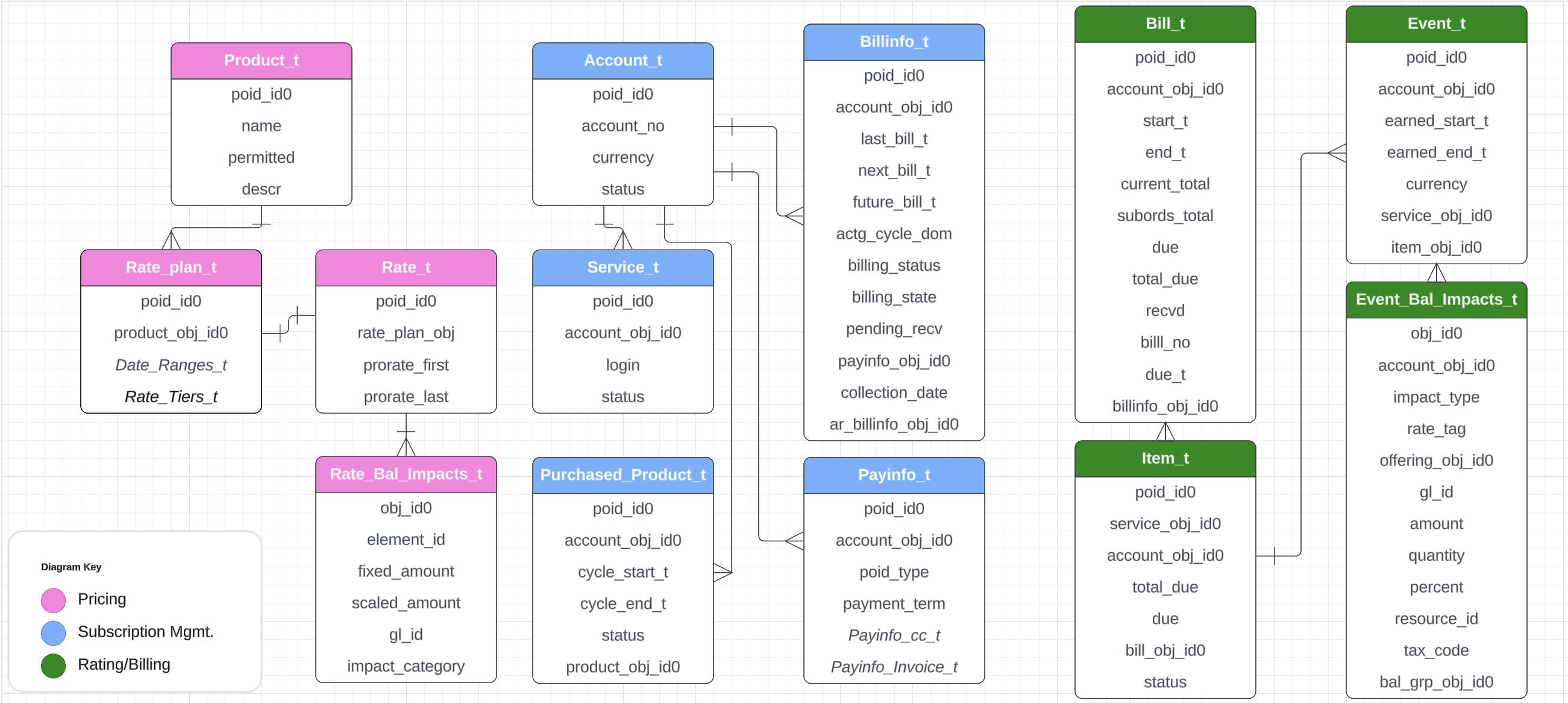
Queries for reference which are useful in all BRM projects: Sample Queries
⚙️ Oracle BRM Base Opcodes· Feb 2016
In Oracle BRM, a base opcode is a fundamental operation or API used to perform CRUD actions in the system. These opcodes are predefined and serve as the building blocks for implementing business logic within the BRM framework.
| Opcode Name | Details |
|---|---|
PCM_OP_CREATE_OBJ | Used to create new objects or entities in the BRM database. |
PCM_OP_DELETE_OBJ | Used to delete existing objects or entities from the BRM database. |
PCM_OP_READ_OBJ | Used to retrieve information or data from existing objects in the BRM database. |
PCM_OP_WRITE_FLDS | Used to update existing objects or entities in the BRM database. |
PCM_OP_SEARCH | Widely used opcode to search for objects based on specified criteria. Data can be retrieved from two or more entities by specifying a link between them. |
Note: PCM_OP_BULK_WRITE_FLDS is also used to update fields like PCM_OP_WRITE_FLDS but is optimised for updating the same set of fields across a large number of objects in a single operation.
⚡ Oracle BRM Standard / Policy / Custom Opcodes· Nov 2016
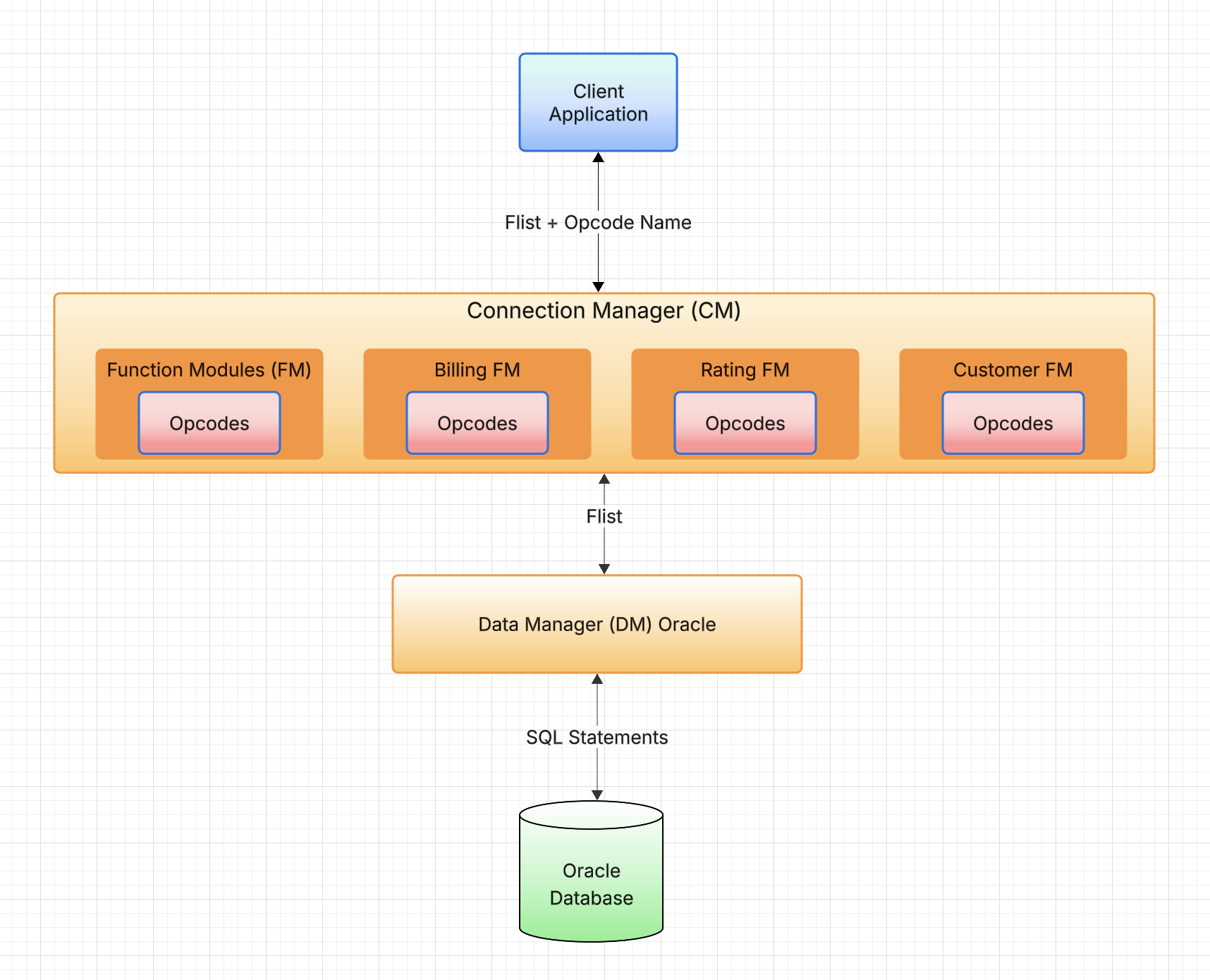
Standard opcodes are BRM APIs which are part of BRM Function Modules (FM). They can be exposed as REST APIs to integrate with different applications. Below are some examples provided out-of-the-box:
| Standard Opcode Name | Details |
|---|---|
PCM_OP_CUST_COMMIT_CUSTOMER | Used to create or modify customer accounts, purchase products & discounts. |
PCM_OP_ACT_USAGE | Rates and records an event. |
PCM_OP_BILL_MAKE_BILL | Main opcode that provides billing for the specified billinfo object. |
PCM_OP_PYMT_COLLECT | Performs payment collections and refunds. |
PCM_OP_COLLECTIONS_PROCESS_BILLINFO | Determines whether bill units enter or exit collections and performs collection actions. |
Policy Opcodes are hooks provided inside standard opcodes to implement customizations. BRM provides a .c file for every policy opcode where developers can implement changes as per business needs:
| Policy Module | Example with Details |
|---|---|
| Subscription FM Policies | PCM_OP_SUBSCRIPTION_POL_SPEC_CYCLE_FEE_INTERVAL: Specify a different start, end, scale for cycle fee events |
| Rate FM Policies | PCM_OP_RATE_POL_PRE_RATING: Modify the input flist sent for ratingPCM_OP_RATE_POL_POST_RATING: Perform any update after rating the event |
| Bill FM Policies | PCM_OP_BILL_POL_SPEC_BILLNO: Customize the bill number generated by billingPCM_OP_BILL_POL_POST_BILLING: Perform any operation immediately after billing |
| Invoice FM Policies | PCM_OP_INV_POL_PREP_INVOICE: Enrich the invoice with additional information |
| Collections FM Policies | PCM_OP_COLLECTIONS_POL_EXEC_POLICY_ACTION: Perform specific tasks on collection actionsPCM_OP_COLLECTIONS_POL_EXIT_SCENARIO: Execute actions like resume service when billinfo leaves collections scenario |
BRM also supports custom opcodes to fulfill business-specific requirements. Input Flists for Opcodes for Reference: View
🔧 Inbuilt OBRM Functions and Macros· Aug 2018
Important functions/macros frequently used in BRM opcodes:
Flist Management Macros
| Name | Details |
|---|---|
PIN_FLIST_CREATE(ebufp) | Allocates memory and creates a new flist |
PIN_FLIST_FLD_GET(flistp, fld, optional, ebufp)PIN_FLIST_FLD_TAKE(flistp, fld, optional, ebufp) | Retrieve a field value from an flist. GET is read-only; TAKE removes the field from the flist and takes ownership |
PIN_FLIST_FLD_SET(flistp, fld, valp, ebufp)PIN_FLIST_FLD_PUT(flistp, fld, valp, ebufp) | Sets a field value on an flist. PUT gives ownership of the field to the flist |
PIN_FLIST_FLD_COPY(src_flistp, src_fld, dest_flistp, dest_fld, ebufp) | Copy a field between flists |
PCM_OP(ctxp, opcode, inflistp, opflistpp, flg, ebufp) | Invokes an opcode with the given input flist and flags, sets response in the output flist |
PIN_FLIST_DESTROY_EX(flistpp, NULL) | Frees allocated memory for an flist; invoke once the flist is no longer in use |
PIN_FLIST_ELEM_GET(flistp, fld, elem_id, optional, ebufp) | Retrieve an array field from an flist |
PIN_FLIST_ELEM_GET_NEXT(flistp, fld, recidp, optional, cookiep, ebufp) | Loop through an array field in the flist |
PIN_FLIST_SUBSTR_GET(flistp, fld, optional, ebufp) | Retrieve a substruct field from an flist |
PIN_FLIST_ELEM_ADD(flistp, fld, elem_id, ebufp)PIN_FLIST_ELEM_SET(flistp, elem_flistp, fld, elem_id, ebufp) | ADD = append, SET = update existing by elem id. If you're populating a fresh array in a loop, use ADD. If you're modifying a specific already-present element, use SET |
PIN_FLIST_CONCAT(dest_flistp, src_flistp, ebufp) | Concatenate two flists |
PIN_FLIST_SORT(flistp, sort_listp, sort_default, ebufp) | Sort an flist |
Other Macros
| Name | Details |
|---|---|
PIN_POID_CREATE(db, type, id, ebufp) | Allocates memory and creates a new poid |
PIN_POID_COMPARE(pdp1, pdp2, check_rev, ebufp) | Compares two poids for equality |
PIN_POID_IS_NULL(pdp) | Determines if the given poid is null |
PIN_POID_DESTROY(pdp, NULL) | Frees allocated memory for a poid |
PIN_BEID_IS_CURRENCY(currencyid) | Returns 1 if the integer is a currency resource, 0 otherwise |
PIN_ERR_LOG_FLIST(loglevel, descr, flistp) | Logs an flist value to cm.pinlog for troubleshooting |
PIN_ERR_LOG_MSG(loglevel, descr) | Logs a string value to cm.pinlog for debugging |
pbo_decimal_from_str(str, ebufp) | Creates a new decimal variable from a string value |
pbo_decimal_is_zero(dec, ebufp) | Returns 1 if the decimal is zero, else 0 |
pbo_decimal_add_assign(dest, src, ebufp)pbo_decimal_subtract_assign(dest, src, ebufp) | Performs add/subtraction of two decimal values |
pbo_decimal_compare(dec1, dec2, ebufp) | Compares two decimals. Returns -1, 0, or 1 if first is less, equal, or greater |
pbo_decimal_sign(dec, ebufp) | Returns the sign: -1 for negative, 0 for zero, 1 for positive |
pbo_decimal_destroy(&dec) | Frees allocated memory for a decimal; invoke once no longer in use |
Utility Functions
| Utility Name | Details |
|---|---|
fm_utils_trans_open(ctxp, flg, pdp, ebufp) | Opens a transaction and locks the given object in read/write mode to maintain data integrity |
fm_utils_trans_commit(ctxp, ebufp)fm_utils_trans_abort(ctxp, ebufp) | Commit or abort a transaction opened via fm_utils_trans_open() |
fm_utils_is_subtype(pdp, value) | Returns 1 if the poid type is a subtype of the passed value, 0 otherwise |
fm_utils_add_n_days(num, timep) | Adds a specific number of days to the given time variable |
fm_utils_op_is_ancestor(connp->coip, opcode) | Returns 1 if the given opcode is an ancestor of the current opcode in the call stack |
fm_utils_time_round_to_midnight(time) | Rounds the given time variable to midnight |
CM_FM_SET_NAMED_TRANS_FLIST(ctxp, flistp, TRANS_FLIST)CM_FM_GET_NAMED_TRANS_FLIST(ctxp, TRANS_FLIST)CM_FM_DROP_NAMED_TRANS_FLIST(ctxp, TRANS_FLIST, ebufp) | SET stores an flist in one opcode; GET retrieves it in another opcode within the same transaction. DROP removes it from memory. |
🔄 MTA with Examples· Mar 2020
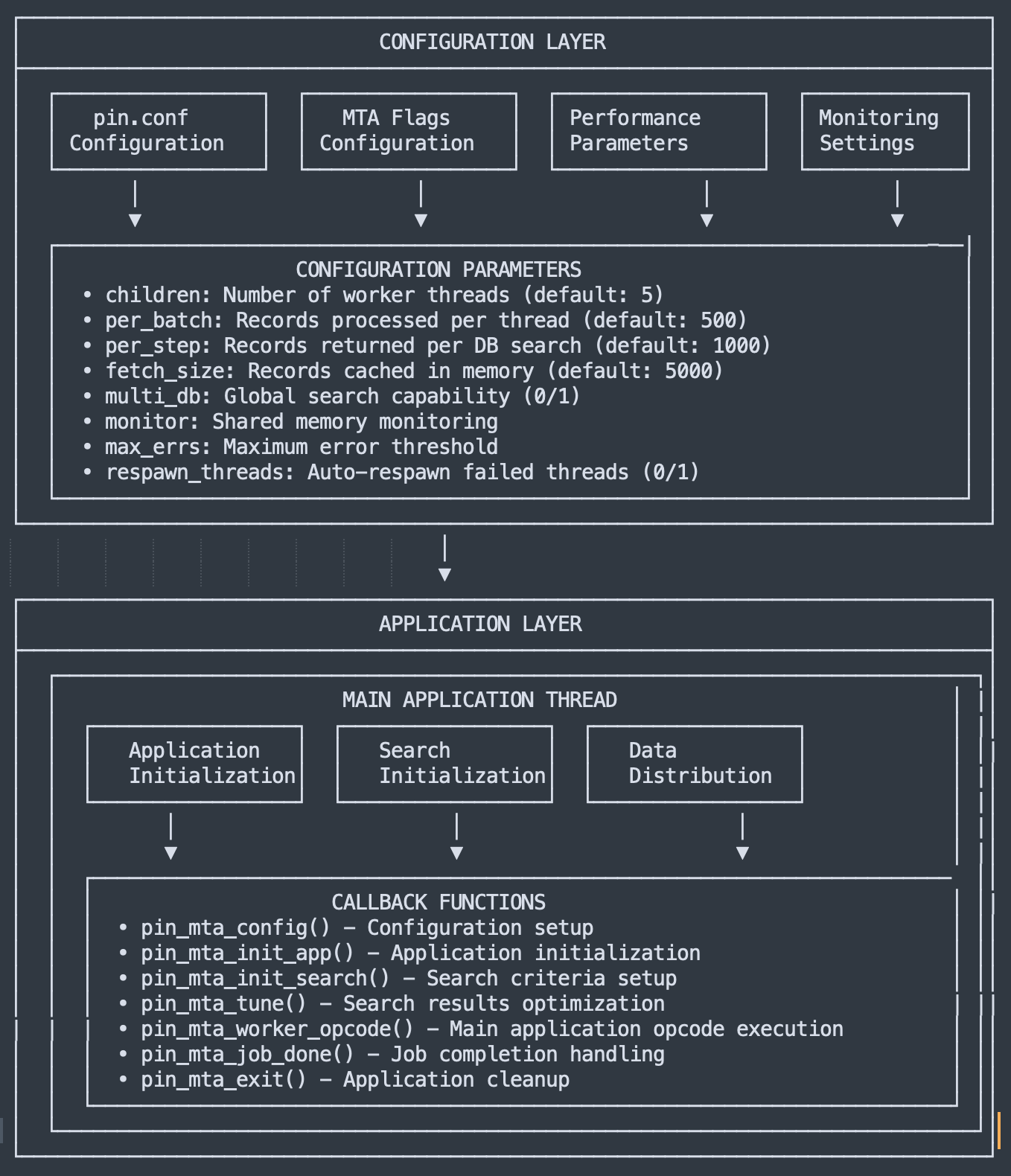
MTA application is implemented to process operations/opcodes in batch mode. This multi-threaded application executes in parallel for high-volume processing. MTA can also be used to execute API calls asynchronously — requests are recorded in a staging table and processed in batch, enabling better error handling and retry mechanisms.
MTA Utilities (Scheduled For Daily Run)
| Command | Details |
|---|---|
pin_deferred_act -verbose | Processes the scheduled actions based on current date |
pin_discount_cleanup -m close -verbose | Cancels the /purchased_discount objects which are expired as of current date |
pin_cycle_fees -cancel -verbose | Cancels the /purchased_product objects which are expired as of current date |
pin_bill_accts -active -retry -pay_type 10001 -verbose | Executes BDOM billing for Credit Card (CC) pay type |
pin_cycle_fees -cycle_fees -verbose | Applies cycle charges for products scheduled to start as of current date |
pin_collect -active -pay_type 10003 -vendor fusa -verbose | Collects payment for CC pay types through payment gateway |
pin_refund -active -pay_type 10003 -vendor fusa -verbose | Processes refund for CC pay types through payment gateway |
pin_collections_process -report -verbose | Identifies any overdue bills and applies collection actions based on dunning rules |
pin_ledger_report -mode export | Generates ledger report based on General Ledger (GL) configuration |
🐛 Debug OBRM CNE Deployments on Kubernetes· Jan 2022
Deployment and monitoring of applications running as pods in Kubernetes (k8s) is done using Helm & kubectl respectively.
- Helm is a package manager that includes helm charts which help in deploying k8s objects. Using one YAML configuration file, an entire application can be deployed on k8s.
- Kubectl is a command-line tool to execute operations on a Kubernetes cluster in order to monitor and analyze pods and other services.
| Helm Command | Details |
|---|---|
helm install <brm-release-name> oc-cn-helm-chart --namespace <brm-namespace> --values oc-cn-helm-chart/override-values.yaml | Initial install to deploy new pods/services e.g. BRM pods |
helm upgrade <brm-release-name> oc-cn-helm-chart --values oc-cn-helm-chart/override_values.yaml -n <brm-namespace> | Deploy changes done in config YAML file |
helm status <brm-release-name> -n <brm-namespace> | Check the helm status after install |
helm history <brm-release-name> -n <brm-namespace> | Check the history of helm commands executed |
Important kubectl Commands
| kubectl Command | Details |
|---|---|
kubectl get nodes -o wide | View k8s nodes running in cluster with details |
kubectl -n <brm-namespace> get pods -o wide | Check all running pod statuses |
kubectl -n <brm-namespace> exec -it <pod-name> bash | Log in to a BRM pod instance |
kubectl -n <brm-namespace> describe pod <pod-name> | Check details about a particular pod |
kubectl -n <brm-namespace> get svc | Check service types and status |
kubectl -n <brm-namespace> logs --since=1h -f <pod-name> | View time-bound logs of a specific pod |
kubectl -n <brm-namespace> get hpa | Check Horizontal Pod Autoscaler (HPA) |
kubectl describe pvc --namespace <brm-namespace> | Retrieve details of persistent volume claim |
🏗️ Oracle ECE Architecture· Sep 2023
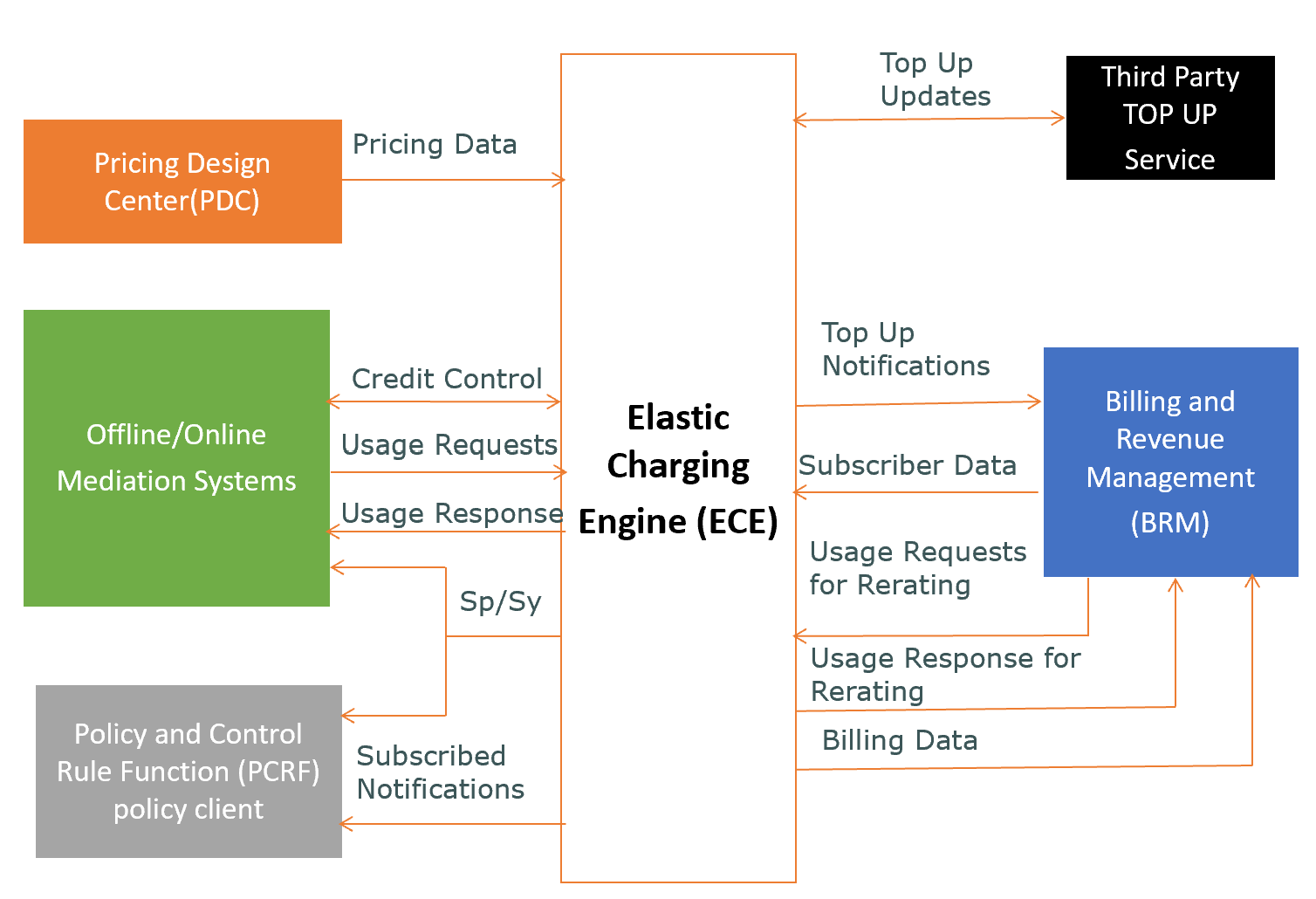
This shows the ECE architecture and supported integrations with different systems like PDC, BRM, Mediation System etc.:
🧪 Benefits of JUnit Testing in Oracle BRM· Jun 2026
JUnit is a Java-based unit testing framework used to write and run repeatable, automated test cases. In the BRM context, it becomes the backbone of a functional test suite that drives real BRM opcodes end-to-end and verifies the resulting data, rather than testing Java code in isolation.
Using the PCM Java API, a JUnit test can directly invoke BRM opcodes and batch/MTA processes the same way a client application or scheduled job would — making it possible to exercise real business scenarios programmatically:
| Use Case | How JUnit + PCM Java API Executes It |
|---|---|
| Opcode execution | Build the input FlistPCM, invoke opcodes like PCM_OP_CUST_COMMIT_CUSTOMER or PCM_OP_ACT_USAGE via the PCM Java API context, and assert on the output flist and resulting DB state. |
| Batch / MTA process execution | Invoke or simulate batch utilities (e.g. pin_bill_accts, pin_cycle_fees) from a test, then validate the objects/events they generate — confirming billing, cycle fees, or collections ran as expected. |
| End-to-end scenario chaining | Combine multiple opcode calls in sequence within one test (e.g. create account → purchase product → run billing → validate invoice) to mirror a real customer lifecycle. |
Key benefits:
- Automation of unit testing — scenarios that would otherwise need manual opcode calls or UI clicks run unattended, consistently, and fast.
- Regression suite for daily runs — the same JUnit suite can be scheduled to run daily (e.g. via CI/Jenkins) against a build, catching regressions introduced by new enhancements before they reach QA or production.
- Faster feedback loop for developers, and a growing library of scenario coverage that documents expected BRM behavior over time.
Interested in Oracle BRM Training?
Functional & technical deep-dive — 20–30 hrs, live online, 1-on-1 & batch.
Share feedback on this blog: learnbillsoft@gmail.com · Recordings: YouTube channel